Promos & pricing
Discount codes and repeat-renter rewards, rates that follow demand, gift vouchers people can buy for someone else, and holiday rate suggestions — all in one place, and nothing changes your prices without your say-so.
- Where
- Money → Promos & pricing
- Who can use it
- Owners and managers.
- Plans
- Every plan.
- Checked
- Sep 25, 2026
What you can do
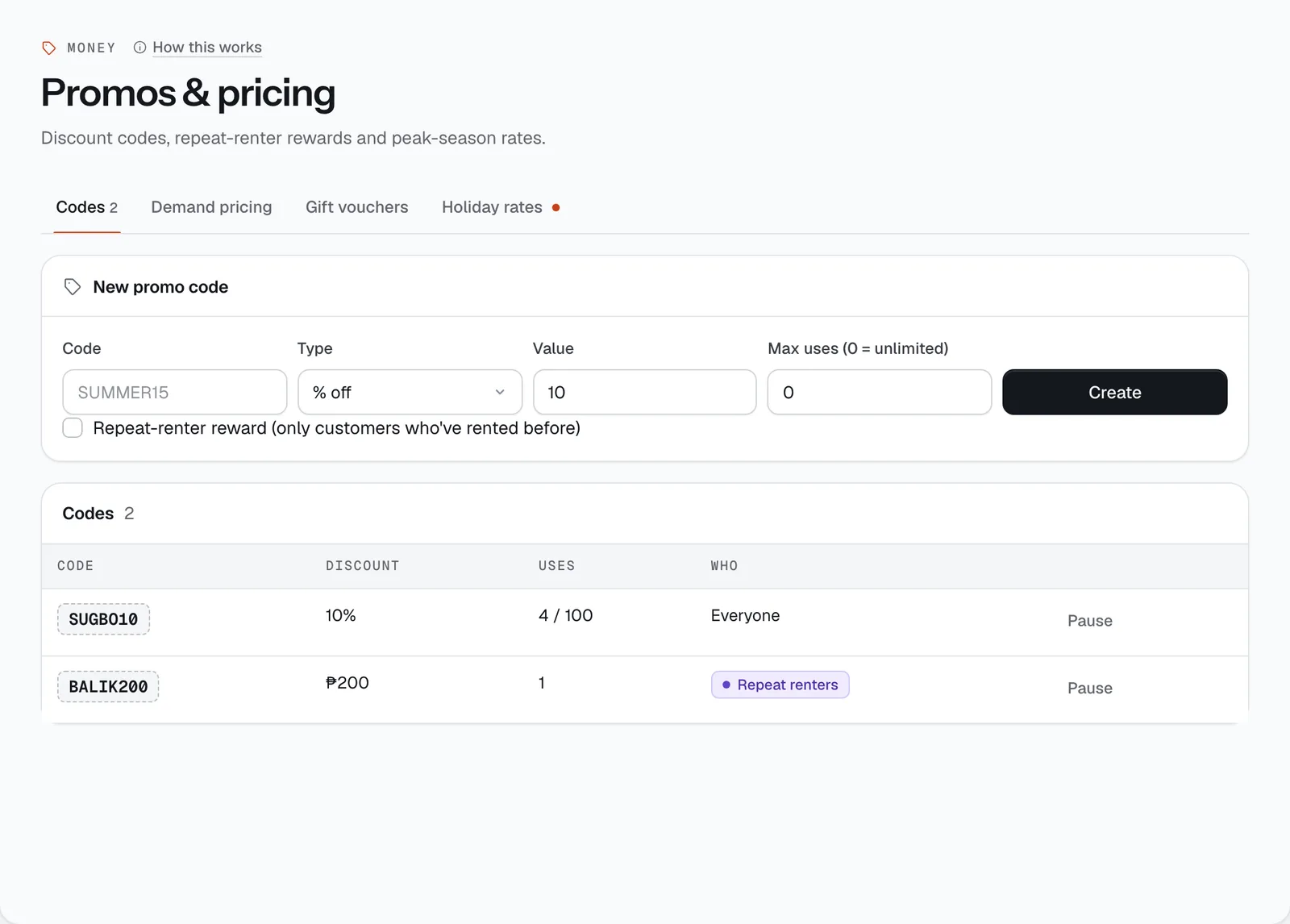
- Create a promo code on the Codes tab: a Code, % off or ₱ off, the Value and Max uses (0 = unlimited), then Create.
- Make it a reward for returning customers with Repeat-renter reward (only customers who’ve rented before).
- Pause a code or Activate it again.
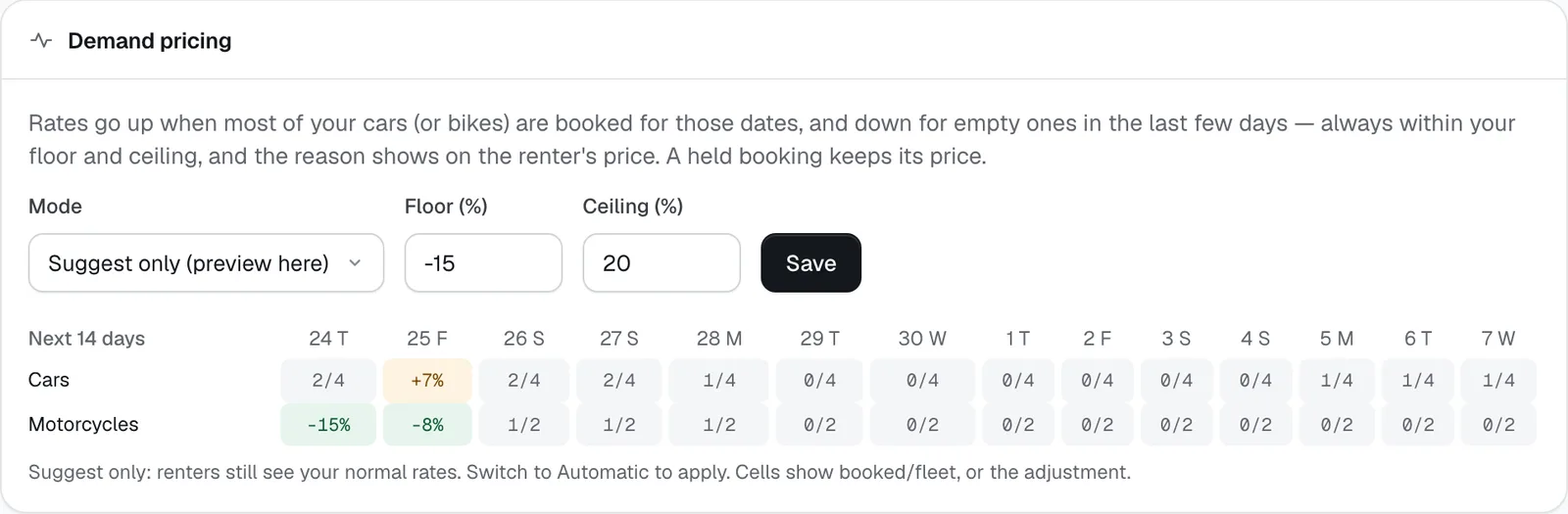
- Turn on Demand pricing and set its Mode, Floor (%) and Ceiling (%).
- See Renters watching: who is waiting for a price drop or for dates to free up, per vehicle.
- Sell Gift vouchers on your site, issue one yourself with Issue, or Void one.
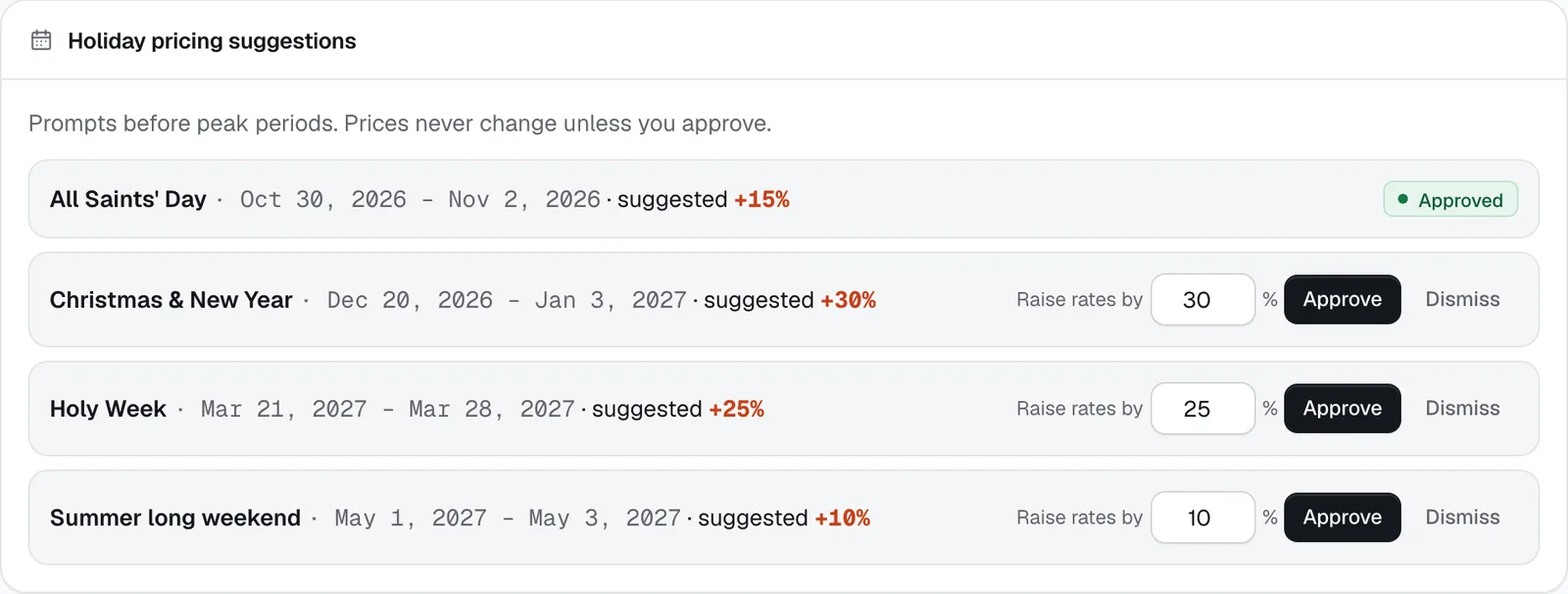
- On Holiday rates, Approve a peak-period rate increase (change the % first if you like) or Dismiss it.
How it works
- Codes are 3–20 letters or numbers (CeeRent makes them capitals). A percentage can be at most 90%. The discount comes off the booking total before any no-deposit waiver or gift voucher, and a ₱ discount can’t go below zero. A use is counted when the booking is paid; once a code reaches its max uses it stops working.
- A repeat-renter code only works for a customer who has at least one paid booking with you.
- When you cancel a booking yourself and tick the voucher box, CeeRent creates a one-time code,
SORRY-plus eight random letters and numbers, worth the percentage in your policy. Only that renter can use it (it’s in the cancellation message they get), and it shows up in your codes list.
Demand pricing
Demand pricing looks at how many of your cars (or, separately, motorcycles) are already booked for the dates a renter picks, and how soon the trip starts:
- 80% or more booked (with at least 2 vehicles of that type): +15%, labelled “busy dates”.
- 60% or more booked: +7%, labelled “popular dates”.
- A third or less booked and the trip starts within 1 day: −15%, a “last-minute deal”.
- A third or less booked and the trip starts within 3 days: −8%, a “short-notice deal”.
The change never goes past your Floor (%) (between −40% and 0%; −15% by default) or Ceiling (%) (0% to +50%; +20% by default). The reason is written on the renter’s price, for example “busy dates — 4 of 5 cars booked +15%”. Once a renter holds a booking, their price is fixed.
Mode has three settings: Off; Suggest only (preview here), which shows a table of the next 14 days but leaves your prices alone; and Automatic, which applies the changes on your booking site. In the table each cell shows booked/fleet, or the adjustment.
Renters watching lists renters who asked, on a vehicle page, to be told when the price drops or when booked dates free up. Their emails are partly hidden — this is for pricing decisions, not for messaging them. If you lower a daily rate (or approve a smaller holiday increase) below what a watcher last saw, CeeRent sends them one email. Promo codes don’t count, because watchers see your public price.
Gift vouchers
Tick Sell gift vouchers on your booking site and a gift page appears on your site at /gift. Buyers pick ₱1,000, ₱2,000, ₱3,500, ₱5,000 or ₱10,000 (or any amount from ₱500 to ₱50,000), add a message, and choose the day it’s emailed to the person — handy for an OFW paying for the family’s car at Christmas.
Vouchers never expire. The Gift Check Act (RA 11765) doesn’t allow gift checks to expire or lose value, so CeeRent doesn’t let them. Renters type the code (like GIFT-AB12-CD34) in the promo box at checkout. It covers the rental, fees and add-ons — not the deposit — and whatever is left stays on the voucher for the next booking. If a booking paid with a voucher is cancelled, that amount goes back on the voucher.
To give one yourself — as a sorry, or because someone paid you by bank transfer — enter the amount, who it’s for, their email and why, then Issue. Void stops a voucher from being used; if the buyer paid, refund them separately. The header shows your Unspent balance — money you owe in rentals.
A voucher bought online gets an official receipt when it’s sold.
Holiday rates
Before busy periods — Holy Week, Christmas and New Year, All Saints’ Day, a summer long weekend — a suggestion appears on the Holiday rates tab with the dates and a suggested increase, and the tab shows a dot. Change the number next to Raise rates by (1–100%) and tap Approve, or tap Dismiss.
Prices never change unless you approve. Once approved, your daily and hourly rates go up by that percentage for bookings that start within those dates. It adds on top of demand pricing.
Your normal rates are set per vehicle in Vehicles. Longer-rental discounts, the prepaid rate and the no-deposit option are in Settings → Policies.
- Mode
- Floor (%)
- Ceiling (%)

- Sell gift vouchers on your booking site
- Issue
- Approve
- Dismiss
Still not sure how it works?
Ask a person, in Filipino or English — Mon–Sat, 8:00–20:00 PHT.