Dashboard · Workspace
Team & licences
Invite your staff, give each person a role, and manage the user licences your plan includes. Every staff member needs a licence. Renters never do.
- Where
- Workspace → Team & licences
- Who can use it
- Owners and managers can invite, edit and deactivate staff. Only the owner can buy or reduce licences and transfer ownership.
- Plans
- Every plan. Included licences: Starter: 1 full; Standard: 2 full, 1 viewer; Plus: 5 full, 3 field, 2 viewer. Extra licences are ₱199 full, ₱99 field and ₱49 viewer a month.
- Checked
- Sep 25, 2026
What you can do
- Invite a staff member with Invite someone: their name, email or mobile, a Role and, if you have more than one branch, the branches they work at.
- Set a Refund limit (₱) for front-desk staff when you invite them.
- Change someone’s role or branches with Edit. It applies right away.
- Remove access for someone who left with Deactivate, and bring them back later with Reactivate.
- Buy one more licence (+ 1 full, + 1 field or + 1 viewer) or schedule fewer with Reduce licences….
- Check who protects their sign-in with a phone code in the Two-step column.
- Hand the business to someone else with Transfer ownership (owner only).
How it works
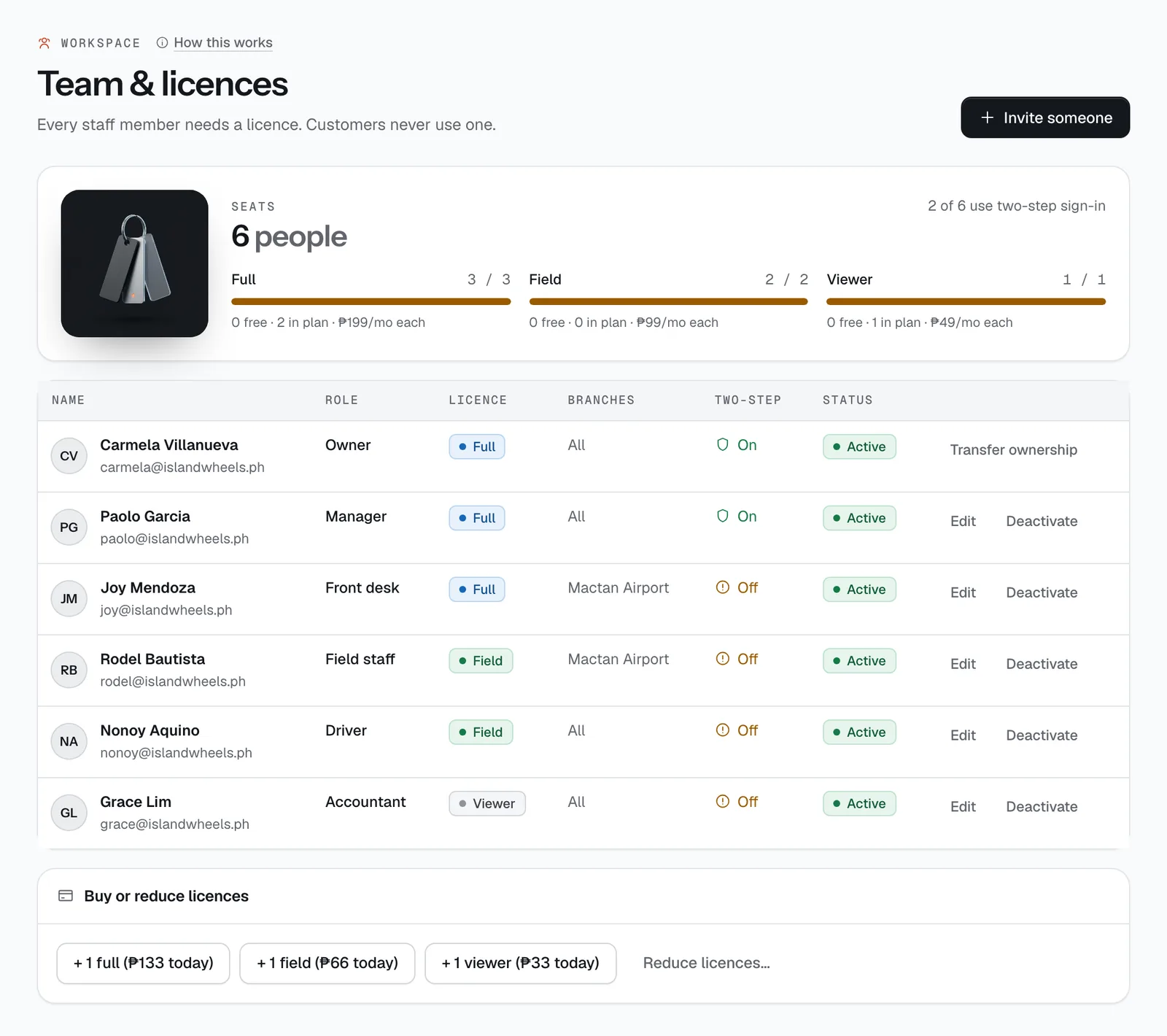
- The Seats panel at the top shows how many people are active, how many use two-step sign-in, and for each licence type: used / owned, how many are free, how many your plan includes, and the monthly price.
- Every role needs a free licence of the right type (see the table below). If there isn’t one, the invite form says so and the owner sees a Buy full licence (or field, viewer) button right there.
- The invite goes out by email. The person accepts it and sets up their own sign-in. Until then their status is Invited; after that it’s Active.
- Branches. Limit to branches (none = all) ties a person to one or more branches. Field staff see only the handovers at their branches in My schedule. Accountants always see every branch.
- Moving someone between a full role and a field role (for example Front desk to Field staff) swaps their licence type, so you need a free licence of the new type.
- Deactivate ends the person’s access on every device right away and frees their licence for someone else. Their past actions stay in the audit log under their name. You can’t deactivate the owner or yourself.
- Refund limit. Front-desk staff can issue a manual refund up to their limit (₱2,000 unless you set another amount when you invite them). Above it they see “Your refund limit is … Ask a manager.” Owners and managers have no limit. Refunds that follow your cancellation policy aren’t affected.
Roles and what each can do
Pick the role that matches the job. The sidebar only shows each person the pages their role can use.
| Role | Licence | What they can do |
|---|---|---|
| Owner | Full | Everything. Only the owner can manage the subscription and licences, connect or change the payment account, cancel CeeRent and transfer ownership. There is always exactly one owner. |
| Manager | Full | Everything except Subscription, buying or reducing licences, the payment account and ownership transfer. Managers invite staff, change settings, publish the booking site, set prices, see money and reports, export data, read the audit log and issue refunds of any size. |
| Front desk | Full | All bookings (create, change, cancel), customers and licence checks, handover checks, delivery and turnaround, incidents, claims, the inbox, company quotes, payment links and traffic violations. Refunds up to their limit. No vehicles, prices, settings, money pages or reports. |
| Field staff | Field | Only the bookings assigned to their branch: My schedule, handover checks, Turnaround and Delivery. |
| Driver | Field | The same pages as field staff, but only the jobs you give them rather than a branch's: the with-driver bookings and delivery runs you assign to them, and their turnaround tasks. |
| Accountant | Viewer | View-only access to Payments & refunds, Expenses and Reports, plus data exports. No bookings or customers. |
Licence types and prices
| Licence | For | Price |
|---|---|---|
| Full | Owner, Manager, Front desk | ₱199 a month |
| Field | Field staff, Driver | ₱99 a month |
| Viewer | Accountant | ₱49 a month |
Each plan includes some licences (Starter: 1 full; Standard: 2 full, 1 viewer; Plus: 5 full, 3 field, 2 viewer). You only pay for the ones above that.
- Buying. Only the owner sees Buy or reduce licences. A new licence is charged now for the rest of your billing month (the button shows today’s amount, for example + 1 full (₱… today)), then at the full monthly price. The invoice appears in Workspace → Subscription.
- Reducing. Reduce licences… lets you type the number you want of each type, then Schedule reduction. It takes effect on your next billing date. You can’t go below what your plan includes or below the number in use, so deactivate people first.
Transferring ownership
Selling the business, or handing it to a family member? The owner presses Transfer ownership on their own row.
- Choose an active person with a full licence.
- That person must already have two-step sign-in turned on.
- You enter Your two-step code and they enter Their two-step code, both from your authenticator apps.
- Press Transfer.
Billing and owner permissions move to them, and the business email in Settings changes to theirs. You stay on the team as a Manager.
Still not sure how it works?
Ask a person, in Filipino or English — Mon–Sat, 8:00–20:00 PHT.