Payments & refunds
Every peso that moves — payments in, refunds out, deposits held and kept — in one ledger, with the refunds that need you and the receipts CeeRent issued for you. Payments go into your own Xendit account; CeeRent never holds your money.
- Where
- Money → Payments & refunds
- Who can use it
- Owners, managers and accountants can open this page. Export CSV is for owners, managers and accountants. Record manual payout needs refund permission, so on this page it is owners and managers.
- Plans
- Every plan.
- Checked
- Sep 25, 2026
What you can do
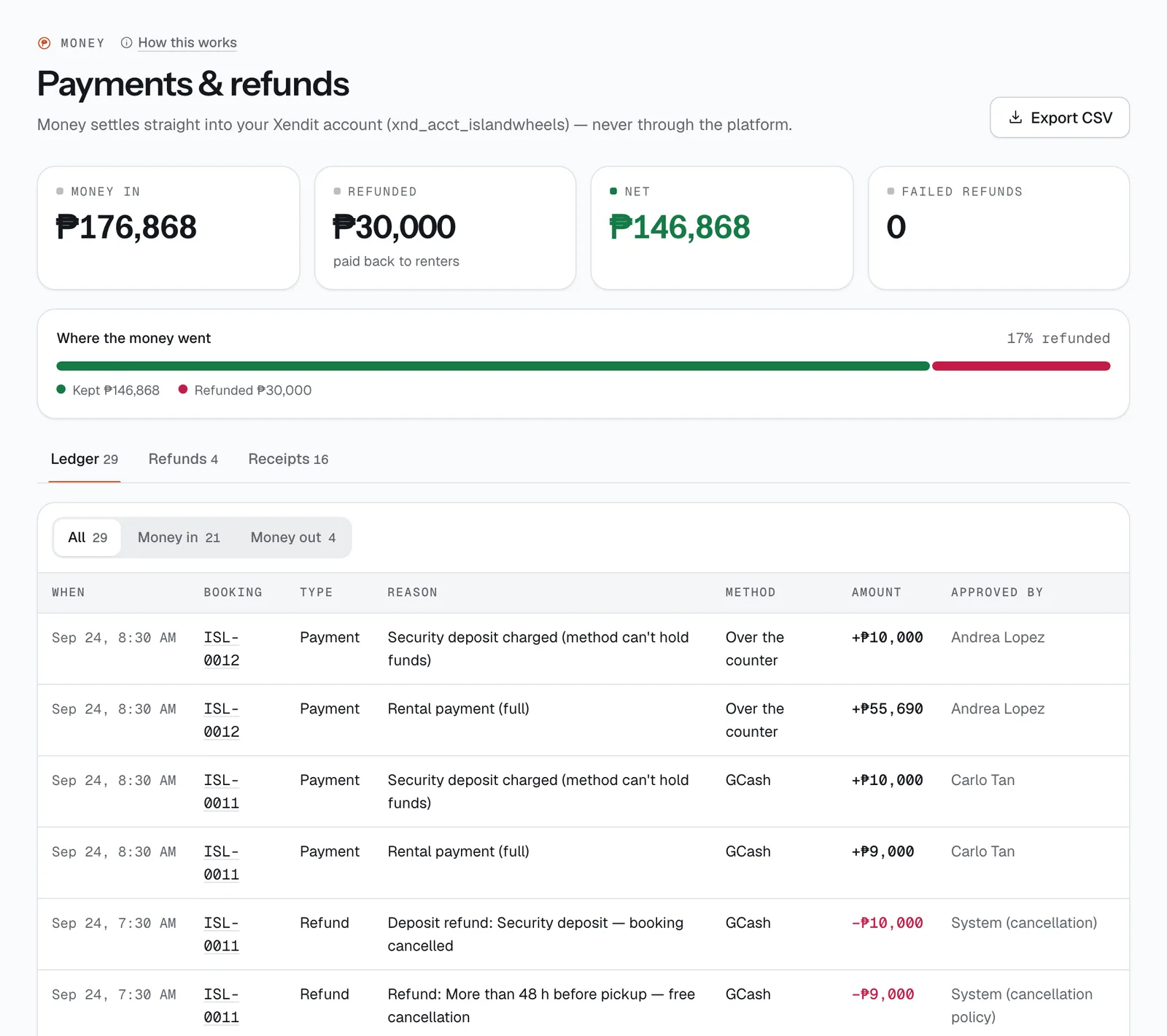
- See the four totals at the top: Money in, Refunded, Net and Failed refunds, plus a bar showing how much you kept and how much went back to renters.
- Read the Ledger tab, newest first, and filter it with All, Money in or Money out. Tap a booking code to open that booking.
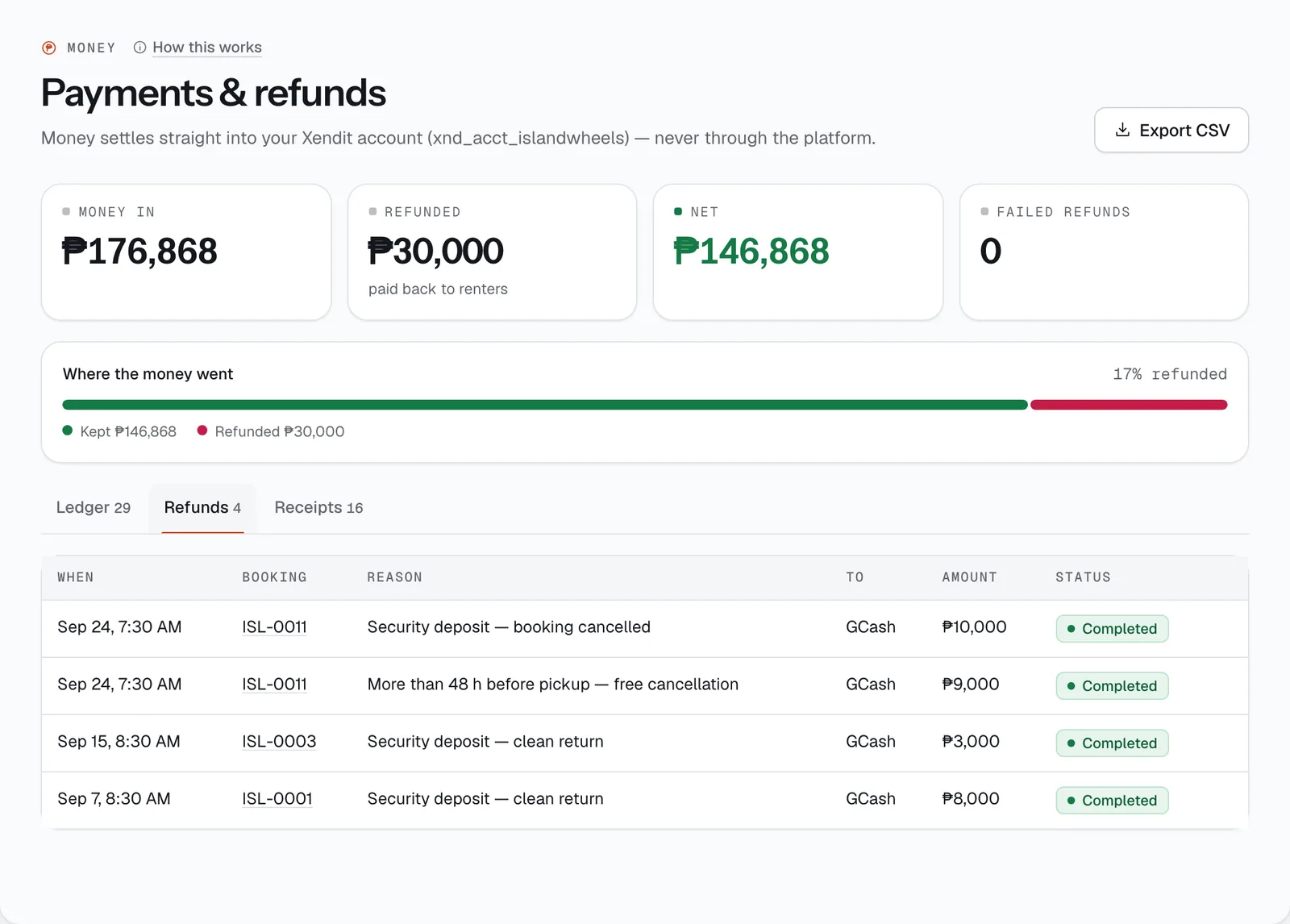
- Follow every refund on the Refunds tab: who it went to, how much, and whether it is Sent, Completed or Failed.
- When a refund fails, tap Record manual payout, send the money yourself, and write where it went.
- Open any official receipt or credit memo from the Receipts tab and Print it.
- Download the whole ledger with Export CSV for your bookkeeper.
How it works
- The ledger is the record of what really happened. Each line shows When, Booking, Type, Reason, Method, Amount and Approved by (a staff name, the renter, or “System” for things CeeRent did on its own). Money in is shown with a plus; money out in red.
- The Type column tells you what kind of movement it was: Payment (money received), Hold (a deposit reserved on the renter’s card or Maya — the money is reserved, not taken, so the amount shows ₱0), Release (that hold let go), Capture (a hold turned into a real charge), Deduction (money kept from a deposit for damage or fees), Invoice (charges billed after a return, or what Klook owes you for an order), Refund, Voucher and Payout.
- Deposits depend on the payment method. Card and Maya can hold a deposit without taking it. GCash, QR Ph and over-the-counter can’t, so the deposit is charged with the booking and refunded after the return. A card hold lasts about 7 days, so for longer rentals the deposit is captured instead and refunded later.
- Refunds go back automatically to the method the renter paid with. That covers cancellations under your policy, the typhoon rule, operator cancellations (Cancel and refund — always a full refund), Vehicle not available, deposit refunds and the Goodwill refund button on a booking. Refunds are rounded to whole pesos.
- Staff giving a manual refund need refund permission and must write a reason. Front desk staff have a refund limit — ₱2,000 unless you set another amount when you invite them in Team & licences. Above it they see
Your refund limit is ₱2,000. Ask a manager.
- How long a refund takes, as CeeRent tracks it: card refunds move from Sent to Completed after about 3 days (the renter is told card refunds can take several business days); GCash, Maya and QR Ph refunds after about an hour. Over-the-counter and cash payments can’t go back to where they came from, so those refunds show as Failed straight away.
- When a refund fails, the renter gets a message asking them to reply with a bank or e-wallet account, the Failed refunds tile turns red, and the refund appears on Today → Needs attention. Send the money yourself (for example by GCash), then on the Refunds tab tap Record manual payout and fill in Sent to — e.g. “GCash 0917 123 4567 · Juan Dela Cruz”. The refund changes to Manual Payout, the ledger gets a note, and a credit memo is issued.
- Export CSV downloads every ledger line with the date, booking code, type, amount, method, reason, who approved it and the payment reference.
Receipts and credit memos
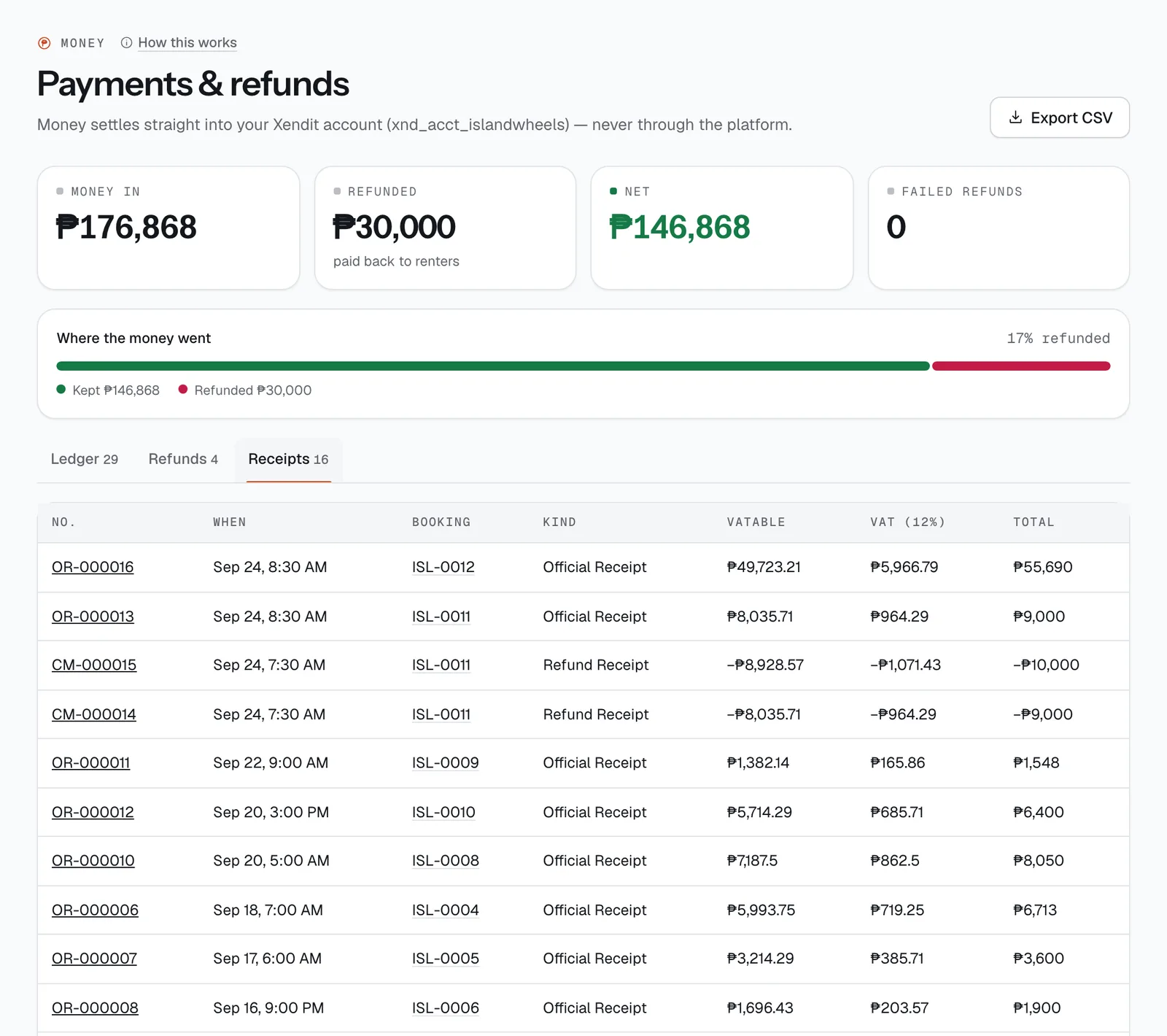
CeeRent writes a receipt for you every time rental money comes in, and a credit memo every time money goes back. You don’t need to type them up. They are listed on the Receipts tab of Money → Payments & refunds, newest first, with No., When, Booking, Kind, VATable, VAT (12%) and Total.
Numbering. Official receipts are numbered OR-000001, OR-000002 and so on; credit memos (refunds) start with CM-. Both share one counter for your business, so the numbers never repeat: after OR-000041 a refund becomes CM-000042, and the next payment is OR-000043.
VAT. Your prices already include VAT. Each receipt splits the total out: VATable sales = total ÷ 1.12, and VAT is the rest. A ₱5,600 total prints as ₱5,000 VATable sales and ₱600 VAT.
An official receipt is issued automatically when:
- a renter pays for a booking — on your booking site, or when staff create a booking and take payment (one line per item when paid in full; one line for the part paid when it’s a partial payment);
- a payment link is paid — for a booking, a balance, charges after a return, or a custom amount;
- a renter pays for an extension, or one person pays their share of a split payment;
- a long-term rental period is paid (with the late fee on its own line);
- a company pays a corporate invoice;
- someone buys a gift voucher on your site.
Security deposits don’t get a receipt — they are the renter’s money you are holding, not a sale.
A credit memo is issued automatically when a refund is sent successfully, and when you record a manual payout for a refund that failed.
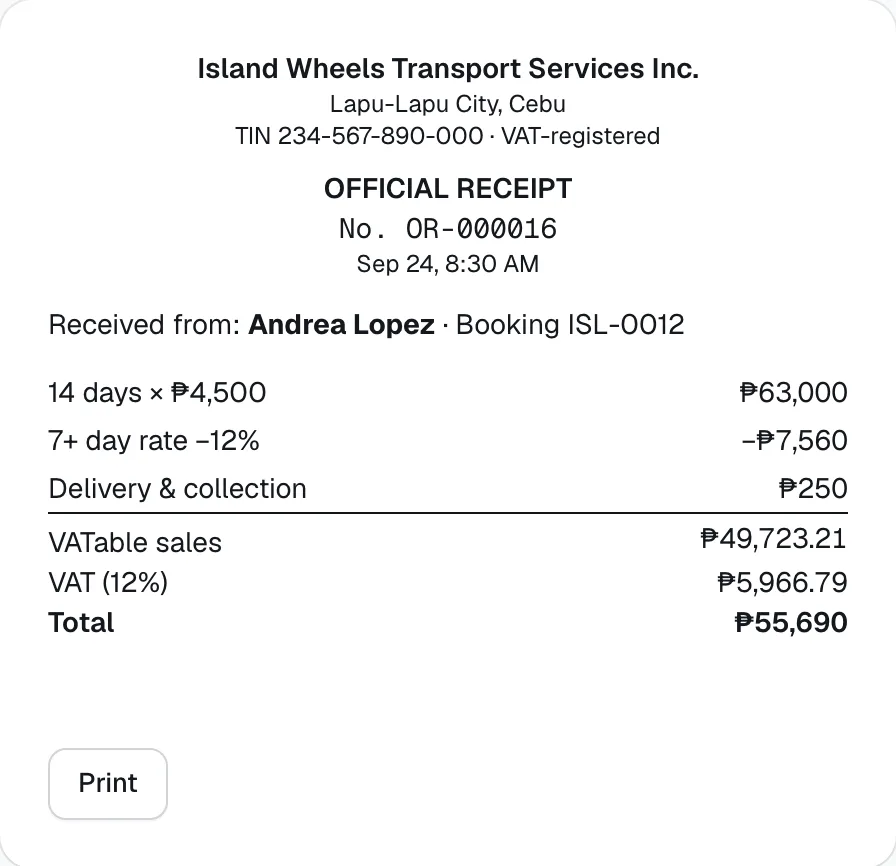
What the printout shows. Your legal business name, address and TIN (from Settings → Business), the title “OFFICIAL RECEIPT” or “CREDIT MEMO (REFUND)”, the number, date and time, who it was received from and the booking code, each line, then VATable sales, VAT (12%) and the total. Tap a number on the Receipts tab to open it, then tap Print — the button itself doesn’t print. Use your browser’s “Save as PDF” if you want a file to send.
Renters see the receipt number too: a paid payment link shows it in the confirmation email.
- Refunds
- Receipts
- Receipt number
Still not sure how it works?
Ask a person, in Filipino or English — Mon–Sat, 8:00–20:00 PHT.